Overview
After installing Kerio Control from a downloaded .iso image, users may encounter a system freeze upon reboot. The initial installation appears successful, but the appliance fails to boot fully.
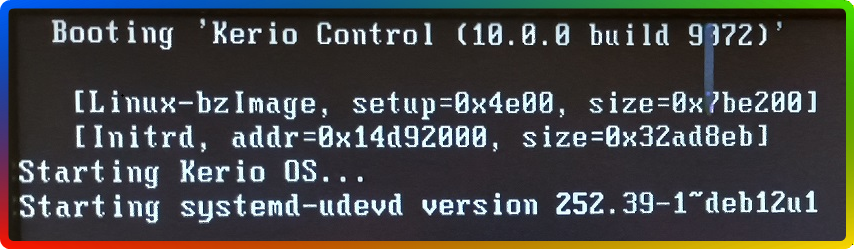
Upon pressing a key at the freeze point, numerous "read-only file system" errors appear, alongside tune2fs and mount-related issues referencing /dev/sda4.
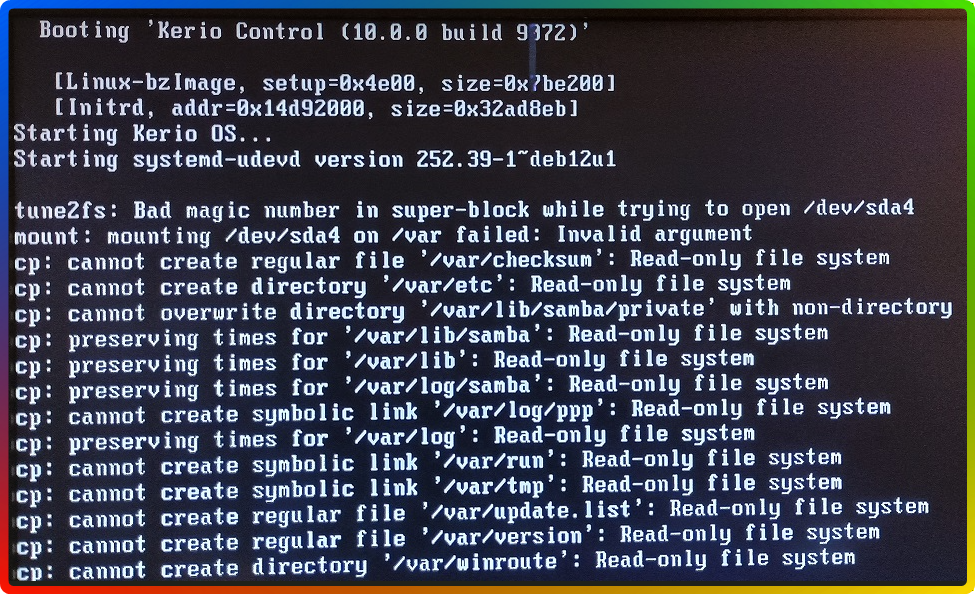
Symptoms:
-
System freezes after first reboot (post-install).
-
Error:
tune2fs: Bad magic number in super-block while trying to open /dev/sda4. -
Mount errors:
/dev/sda4 on /var failed: Invalid argument. -
Multiple
cp: cannot create... Read-only file systemmessages.
Solution
This is known to happen when Kerio Control .iso image is deployed on a drive that was initially formatted with an unsupported partition filesystem (for example ZFS).
Step 1: Boot with GParted Live or Any Linux Live OS
-
Download GParted Live ISO or use a Linux distribution with GParted preinstalled (e.g., Ubuntu).
-
Boot the appliance from the USB stick or CD.
Step 2: Launch GParted
-
Once booted, open GParted.
-
Select the correct disk (usually
/dev/sda). -
Delete all partitions:
-
Right-click each partition and choose Delete.
-
Do this for all visible partitions (ZFS or otherwise).
-
-
Apply all changes by clicking the green ✔️ button.
Step 3: (Optional) Create a New ext4 Partition
-
Still in GParted, click New to create a partition.
-
Set:
-
File system:
ext4 -
Partition label: (optional)
-
-
Click Apply.
Step 4: Reboot and Install Kerio Control
-
Remove the GParted USB.
-
Re-Initiate the process for Installing Software Appliance on bare-metal server
Summary
If Kerio Control freezes on boot after installation and displays file system errors (likeBad magic number in super-block while trying to open /dev/sda4), it's likely due to disk format issues or corrupted partitions. Use GParted to delete all existing partitions (especially ZFS) before installation.
Frequently Asked Questions (FAQ)
Q1: Why does Kerio Control say "Bad magic number in super-block"?
A1: This error usually means the partition is not formatted with a valid Linux file system, or it's corrupted.
Q2: Can I use other tools besides GParted?
A2: Yes — tools like wipefs, fdisk, or parted in a Linux Live USB session will also work.
Q3: What type of file system should Kerio Control use?
A3: Kerio Control installs its own optimized Linux partition scheme during setup. Ensure no external formatting is done beforehand.
Ciprian Nastase
Comments