Overview
All system alert messages are recorded in the Alert log. The Alert log provides a complete history of system alerts generated by GFI KerioControl: virus detection, dialing and hanging up, reached quotas, detection of P2P networks, etc.
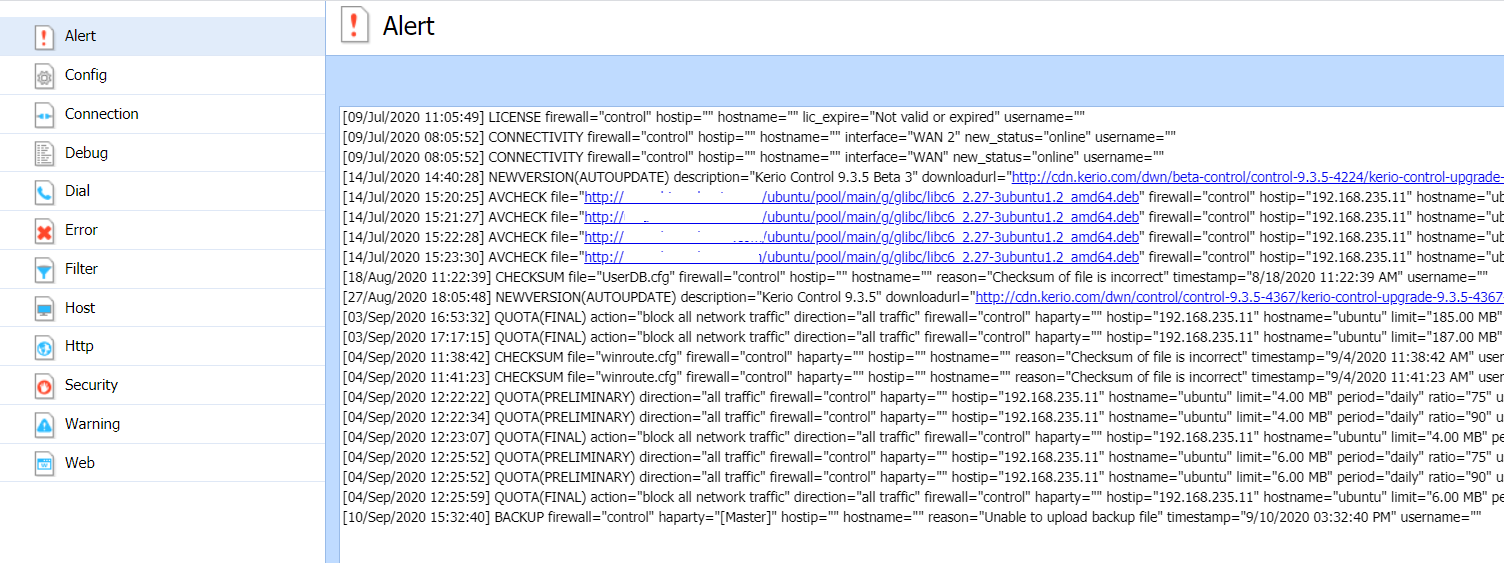
Each event in the Alert log includes a timestamp (date and time when the event was logged) and information about the alert type (in capitals). The other information varies by alert type.
Solution
Viewing Alerts
To view all generated GFI KerioControl system alerts, go to Status > Alert Messages.

Alerts are displayed in the language chosen for the administration interface. The left side of the Alerts section lists all alerts sorted by date and time. Each line provides information on one alert:
- Date — Date and time of the event.
- Alert — Event type.
It is possible to hide or show detailed information by clicking the Hide Details or Show Details button in the bottom-right corner.
System Alerts
You can add the following system alerts:
- A peer-to-peer network client detected — GFI KerioControl sends this alert when users start using P2P. The alert includes information about IP address, resolution (P2P was blocked or traffic was slowed down), and so on.
- Antivirus check failed — GFI KerioControl sends this alert when the antivirus engine fails to check files (typical for password-protected or damaged files).
- Configuration backup failed — GFI KerioControl sends this alert when configuration backup to MyKerio or an FTP server fails.
- Configuration file checksum is incorrect — GFI KerioControl sends this alert when someone changes any configuration file.
- DHCP scope exhausted — GFI KerioControl sends this alert when there are no free IP addresses in the DHCP scope.
- Host connection limit reached — GFI KerioControl sends this alert when hosts in the local network reach the connection limit (typical when a Trojan horse or spyware has infected the host).
- Internet connectivity changed — GFI KerioControl sends this alert when the Internet connection fails and the system switches to a secondary line or vice versa.
- License expiration — GFI KerioControl sends this alert 7 days before the expiration of your GFI KerioControl license, GFI KerioControl Software Maintenance, GFI KerioControlWeb Filter, or Kerio Antivirus software. The alert is sent daily until you renew the license.
- License quota exhausted — GFI KerioControl sends two alerts. The first email is sent when 90% of the quota is exhausted. The second email is sent when the quota is fully exhausted.
- Local Certification Authority expiration — GFI KerioControl sends this alert 7 days before the expiration of the local certification authority (CA). You should check the expiration date, create a new local CA, and distribute it to users' browsers. Select this option, if your users use HTTPS filtering because they have a local CA installed in their browsers.
- Low free disk space/memory warning — GFI KerioControl sends this alert when the GFI KerioControl host has less than 300 MB of free disk space and less than 200 MB of free memory available. GFI KerioControl needs enough disk space to be able to save logs, statistics, configuration settings, temporary files (e.g. an installation archive of a new version or a file that is currently scanned by an antivirus engine), etc. Whenever the GFI KerioControl administrator receives such an alert message, they should immediately take appropriate action.
- New version available — A new version of GFI KerioControl has been detected on the Kerio Technologies server during an update check.
- RAS line status changed — This alert is sent when a line (PPPoE, PPTP, or L2TPinterface) is dialed or hung up. The alert message includes the name of the line and type of dialing (manually from the administration interface, automatically in the configured time range, etc.).
- User transfer quota exceeded — A user has reached their daily, weekly, or monthly user transfer quota, and GFI KerioControl has responded by taking the designated action.
Note: If you want to send an alert to the user, edit the quota settings of the corresponding user or domain template.
- VPN tunnel status changed — This alert works for the GFI KerioControl VPN tunnel and the IPsec VPN tunnel. GFI KerioControl sends the alert when the status of the tunnel is changed from Up to Down or from Down to Up.
- Virus detected — The antivirus engine has detected a virus in a file transmitted by HTTP, FTP, SMTP, or POP3.
Priyanka Bhotika
Comments