Overview
This article is for Kerio Control High Availability (HA) environments where DHCP requests are forwarded to Kerio Control through a DHCP relay or IP helper, especially from networks that are not directly connected to a Kerio Control interface.
In a standard HA design, the Kerio Control virtual IP address (VIP) moves between the Master and Slave appliances and provides the always-available address for the active node. Kerio Control also adjusts DHCP behavior for HA-bound scopes: when HA is active, the Slave does not respond to DHCP requests for the interface where the virtual IP is assigned, so only the active node answers on that HA interface.
💡See Kerio Control High Availability (HA) special cases and Configuring High Availability in Kerio Control.
DHCP can appear inconsistent in HA when relays target individual node addresses, or when scopes are defined for non-HA-bound networks. Critically, when a request is sent to the virtual IP, Kerio Control historically accepted it on the virtual IP but replied from the active node’s interface IP — breaking DHCP relay flows on downstream firewalls that enforce stateful validation.
📌 Fix status: A Kerio Control version containing a fix for the HA DHCP reply-source behavior has been released: KerioControl v10 build 9299.
The fix makes DHCP replies use the same local address that received the DHCP request, so relay traffic sent to the HA VIP is answered from the HA VIP. Upgrade both HA appliances to the fixed version or later, and make sure both appliances run the same version and build before retesting.
Typical symptoms include:
-
Both HA devices appear to be assigning DHCP addresses.
-
DHCP relay or IP helper is configured in the environment.
-
DHCP scopes exist for networks not directly associated with Kerio Control interfaces.
-
DHCP may fail entirely in some topologies when relay points only to the virtual IP.
-
Debug shows DHCP started and bound to the virtual IP, yet clients receive no leases.
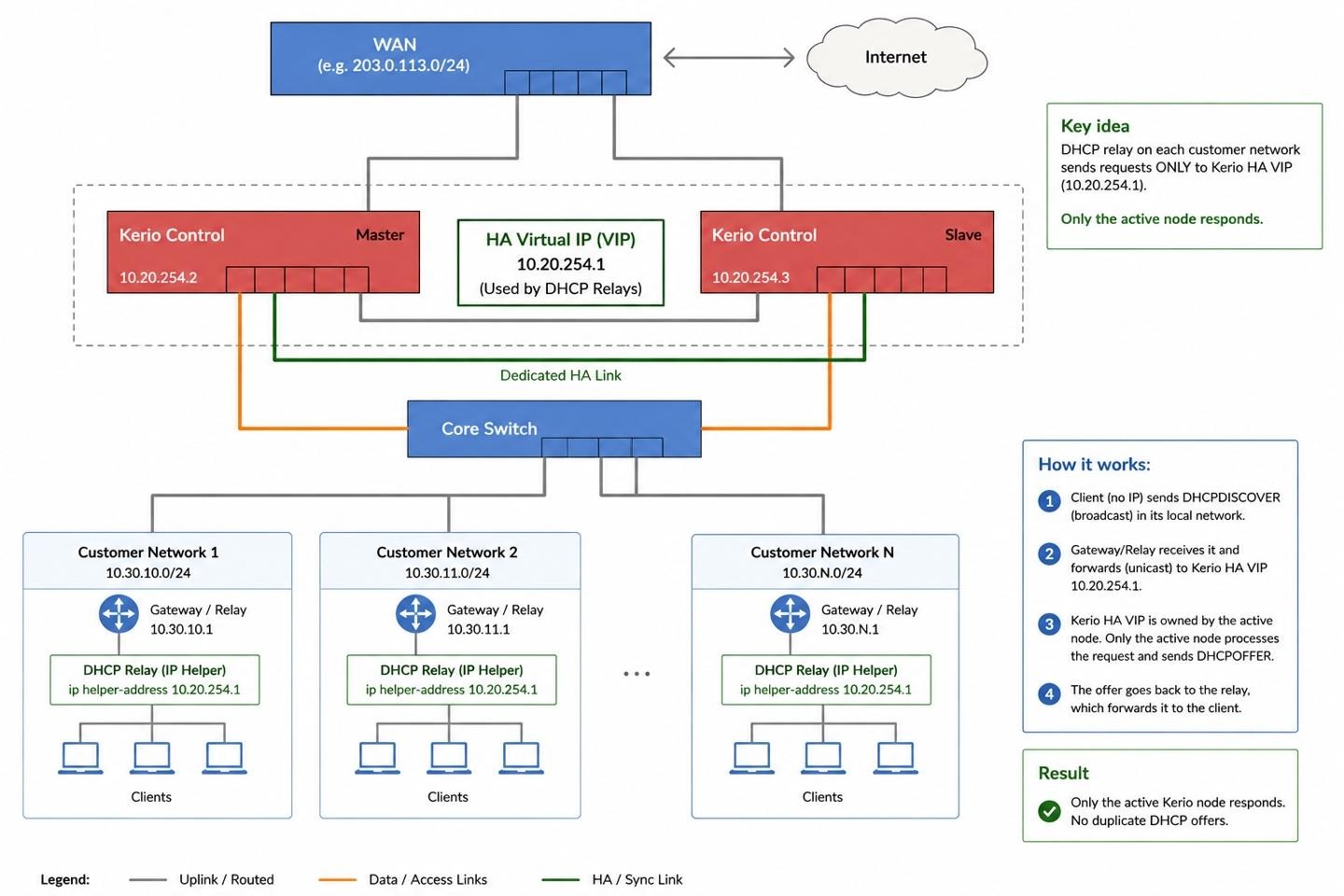
The recommended topology is to configure every DHCP relay or IP helper to point to the Kerio Control HA VIP only. The VIP is owned by the currently active HA node, so the relay has one stable DHCP server target instead of separate node-specific targets.
Solution
1. Upgrade both HA appliances to the fixed Kerio Control version.
- Upgrade both the Master and Slave appliances to the Kerio Control version that contains the DHCP reply-source fix, or to any later version.
- Confirm that both HA appliances run the same Kerio Control version and build. Kerio Control HA validation requires the Master and Slave build versions to match, as documented in High Availability (HA) Status and Health Check messages.
- After the upgrade, confirm that HA status returns to OK before testing DHCP.
Important: Do not leave HA nodes on different builds. Upgrade both appliances, allow HA synchronization to complete, and only then retest DHCP relay behavior.
2. Confirm the HA addressing that DHCP relays should use.
- In the Kerio Control administration interface, go to Configuration > High Availability.
- Record the HA virtual IP address for the interface that should receive DHCP relay traffic.
3. Point DHCP relays or IP helpers to the HA VIP only.
- On each Layer 3 switch, router, firewall, or VLAN interface that performs DHCP relay, remove helper entries that point to the individual Master or Slave appliance IP addresses.
- Add one helper entry that points to the Kerio Control HA VIP.
- Use a configuration pattern similar to this, replacing the address with your actual Kerio Control HA VIP:
ip helper-address 10.20.254.1Use only the HA VIP as the relay target. Do not configure the relay with both node IPs and the VIP for the same client network. That defeats the HA design because relay traffic may reach more than one HA member.
4. Review the DHCP scopes in Kerio Control.
- In Kerio Control, go to DHCP Server.
- Confirm that each relayed client subnet has one matching enabled DHCP scope.
- If the subnet is directly attached to a Kerio Control HA interface, prefer automatic DHCP scope generation where possible. Kerio Control documentation states that only automatically generated scopes are synchronized between Master and Slave, and that automatic HA scopes should use the virtual IP address for the default gateway and DNS server values. See Manual Configuration of Scopes and Reservations in Kerio Control and Automatic Configuration of Scopes in Kerio Control.
- If the subnet is a remote relayed network, confirm that the scope network, subnet mask, lease range, and DHCP options match that remote subnet. Do not change a remote subnet’s default gateway to the Kerio Control HA VIP unless the VIP is actually the intended gateway for that client subnet.
5. Test DHCP with only the HA VIP configured as the relay target.
- Renew a client lease from one affected relayed subnet.
- Confirm that the client receives one offer and one lease.
- Check Logs > Debug with only the required DHCP-related debug options enabled for the shortest practical time. The Debug log is intended for targeted troubleshooting, and excessive debug logging can slow Kerio Control. See Debug Log Features in Kerio Control.
6. If clients still do not receive leases, capture DHCP traffic and contact Support.
If both appliances are upgraded to the fixed version or later, all relays point only to the HA VIP, and the scopes are correct, but DHCP still fails for relayed networks, collect evidence before making further topology changes. A packet capture should show whether the request reaches the HA VIP and whether the reply source address matches what the relay or intermediate firewall expects.
To create a packet dump from the Kerio Control administration interface:
- Go to Logs > Debug.
- Open the context menu and choose Packet Dump To File.
- Use this expression to capture DHCP traffic:
port = 67 | port = 68- Start the capture, reproduce one DHCP lease attempt, stop the capture, and download the file. See Packet Logging and Packet Dumps in Kerio Control.
If you prefer SSH-based capture, use the server-side tcpdump procedure and capture on the Kerio Control interface that receives the relay traffic. See Capturing Traffic on Server-Side of Kerio Control via TCPdump.
Include evidence with the Support request: Kerio Control version and build from both HA nodes, HA status screenshot, DHCP relay or IP helper configuration, DHCP scope screenshots, the exact local time of one failed lease attempt, Debug log covering that time window, packet capture covering that same lease attempt, and whether replies are sourced from the HA VIP or from an individual node IP address.
<supportagent>
Agent note: This behavior is tracked internally as GFICONTROL-526. The implementation reference is kerio-winroute-winroute PR #1859, and the fix commit is present on the 10.0.1 branch as commit 6a73cb50faa209fbddfa9599f7c1f056a18967b3.
Agent-only article: KerioControl HA DHCP Relay Behavior and Virtual IP Response Handling (Agent Guide).
</supportagent>
References
- Kerio Control High Availability (HA) special cases
- Configuring High Availability in Kerio Control
- High Availability (HA) Status and Health Check messages
- Manual Configuration of Scopes and Reservations in Kerio Control
- Automatic Configuration of Scopes in Kerio Control
- Debug Log Features in Kerio Control
- Packet Logging and Packet Dumps in Kerio Control
- Capturing Traffic on Server-Side of Kerio Control via TCPdump
Ciprian Nastase
Comments