Overview
Kerio Control may block legitimate traffic when Shield Matrix classifies a trusted external host (for example, <trusted_source_ip>) as a high-confidence threat (Confidence level 5), resulting in dropped connections.
Shield Matrix reputation is centrally calculated from global telemetry and is updated regularly (approximately every 15 minutes), so an IP can be reclassified even if it has been “trusted” in your environment for years. In newer Kerio Control builds (for example, 9.6.0 build 9161 and later), the preferred resolution is to add a Shield Matrix Whitelist/Exceptions entry for the trusted IP while keeping High confidence protection set to Log and drop for all other traffic.
Error / Symptom
Kerio Control blocks a trusted connection and shows Shield Matrix debug entries similar to:
{shieldmatrix} [ID] <id> connection classified as a threat. Confidence=5, Action=LOG_AND_DROP
Typically observed for traffic such as:
- Source IP:
<trusted_source_ip> - Destination IP:
<destination_ip> - Protocol: TCP
Why this happens
Shield Matrix uses centralized, global threat intelligence and heuristic detection. Reputation can change due to factors outside your environment (for example, short-lived abuse/compromise at a hosting provider, subnet/ASN correlation, or traffic patterns resembling automated attacks).
Key product behavior
- Shield Matrix decisions are not based on a locally editable “blacklist” in the traditional sense.
- Reputation is centrally computed from global telemetry and refreshed regularly (approximately every 15 minutes).
- In newer Kerio Control builds (e.g., 9.6.0 build 9161+), Shield Matrix includes a Whitelist/Exceptions mechanism so business-critical endpoints can bypass Shield Matrix blocking while the rest of the policy remains strict.
Solution
Preferred: Add a Shield Matrix Whitelist/Exception entry (9.6.0 build 9161+)
Prerequisite
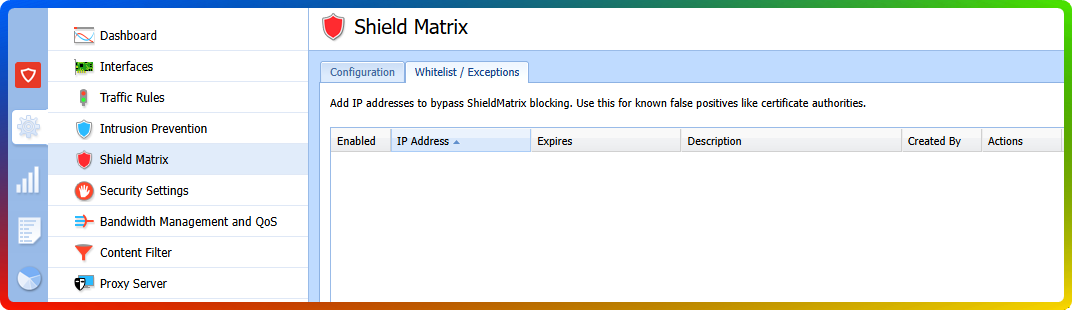
Confirm your Kerio Control build includes Configuration → Shield Matrix → Whitelist/Exceptions (wording may vary by language).
Steps
-
Create or confirm the exception
- Go to Configuration → Shield Matrix → Whitelist/Exceptions.
- Add
<trusted_source_ip>as an exception (or confirm an existing entry is present). - Ensure the exception is enabled.
- Apply/save changes.
-
Restore effective protection for all other traffic
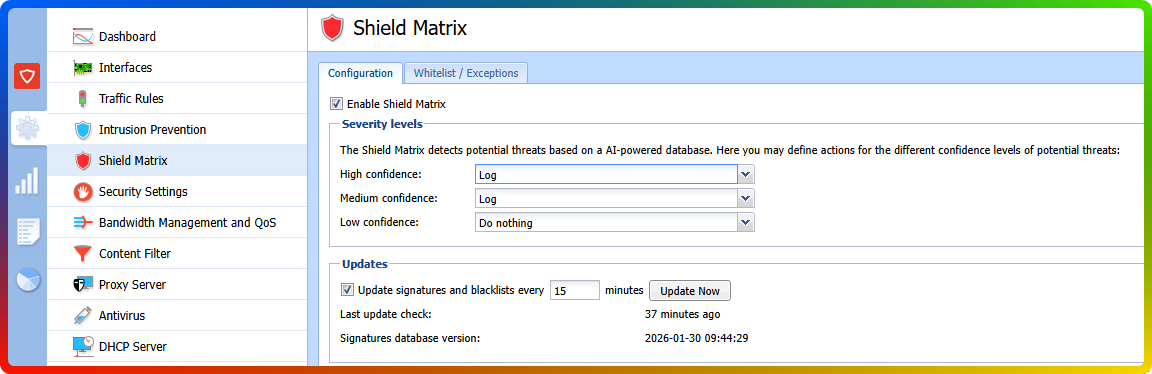
- Go to Configuration → Shield Matrix.
- Set the action for High confidence threats back to Log and drop.
- Apply changes.
Verification
- Retest the application/database connectivity that was failing.
- Check Status → Shield Matrix and/or Logs → Debug (with Shield Matrix-related debug message types enabled).
- Confirm:
- No further drops for
<trusted_source_ip>. - Other Confidence=5 threats are still being blocked (if encountered).
- No further drops for
If Whitelist/Exceptions Is Not Available in Your Build
If your Kerio Control version does not include Shield Matrix Whitelist/Exceptions, the available mitigations are global and may reduce protection:
- Temporarily set the High confidence action to Log only (or No action) to restore connectivity while keeping visibility, or
- Temporarily disable Shield Matrix if immediate connectivity is critical.
Then plan an upgrade to a build that supports Shield Matrix exceptions (for example, Kerio Control 9.6.0 build 9161 or later) - Upgrading Kerio Control.
Frequently Asked Questions
- Q1. How do I know I’m hitting the same issue?
-
A1: You will see Shield Matrix debug entries like
connection classified as a threat. Confidence=5, Action=LOG_AND_DROPfor a legitimate source IP, and the connection will fail until the traffic is allowed. - Q2. Can I “remove the IP from the Shield Matrix blacklist” locally?
-
A2: Not in the traditional sense. Shield Matrix reputation is centrally computed and updated regularly. The supported local control (in newer builds) is Whitelist/Exceptions, which bypasses Shield Matrix blocking for specific trusted IPs.
- Q3. Will setting High confidence threats to “Log only” fix it?
-
A3: It can restore connectivity, but it affects all High-confidence detections (not just one IP), which can significantly reduce protection. Prefer Whitelist/Exceptions if your Kerio Control version supports it.
- Q4. What Kerio Control version supports Shield Matrix Whitelist/Exceptions?
-
A4: This capability is available in newer builds (starting from Kerio Control 9.6.0 build 9161). If you don’t see a Whitelist/Exceptions tab under Shield Matrix, upgrade to a build that includes it.
Ciprian Nastase
Comments